graphic design studio
how a working designer runs image models: prompts written like creative briefs, a brand bible that travels as structured data — with the design tokens that carry it onto screens — and the seeds, reference locks, and QA filters that make fifty generated assets look like one studio shipped them.
Fifty assets by Friday
You're in the graphic design studio. PromptDojo is a practice workspace, not an image generator — you will not make pictures in this browser. What this chapter is: write prompts the way you'd write a brief, lock Halfmoon's brand as a design kit, and filter a fifty-asset batch before the client does. Midjourney, FLUX, and Ideogram are image tools you'll hear named as dialects, not homework for the first screen.
The brief lands on a Tuesday: campaign kit for the spring launch. Hero, three crops, twelve social variants, story formats, a banner set, and the launch landing page — call it fifty deliverables and a screen. Five years ago that was two weeks of studio time and the client knew it. Now the client has seen Midjourney, and the timeline says Friday.
Here's the part the timeline doesn't say: fifty assets that almost match are worse than five that do. A carousel where slide three runs warmer than slide one, a mascot whose face subtly changes between posts, a headline set in whatever typeface the model hallucinated — that's not a fast campaign, that's brand damage at scale. Any intern with a prompt box can generate fifty images. A designer ships fifty assets that look like one hand made them. This chapter is the difference.
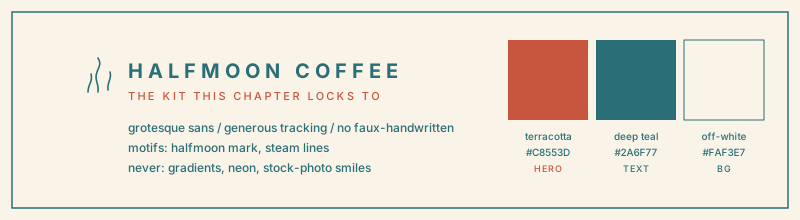
The kit you'll lock to is Halfmoon Coffee. Swatches, type, the mark — the same three hexes the drills compile from. The design-kit lesson hangs the full board next to the dict.
Why it matters
- The tools are already in your studio whether you invited them or not. The Designer Fund / Foundation Capital "AI in Design 2026" survey (900+ designers across 60+ countries) found weekly AI use jumped from 54% to 91% in one year, with roughly three in four designers using it daily. The question stopped being whether — it's whether your output is distinguishable from the flood.
- Your leverage is the part the prompt box doesn't have: a brand. Palette, type voice, motifs, the looks the client refuses to wear. Encoded as structured data, that brand travels into every prompt automatically. Left in a PDF, it travels into none of them.
- Consistency is a systems problem, and systems are checkable. Seeds, style references, and batch QA filters are not vibes — they're parameters and pass/fail gates you can write down, run, and hand to a client as proof.
What AI specifically gets wrong
- It takes "clean and modern" literally, which is to say: randomly. Mood words are client-speak. A model given no concrete tokens fills the gap with the average of its training data, and the average of everything is slop.
- It has never read your brand guidelines. The 40-page PDF you fought for does not exist to an image model. Unless palette, motifs, and banned looks are compiled into the prompt itself, every render starts from zero brand knowledge.
- Every generation is a fresh roll of the dice. Same prompt tomorrow, different composition. Without seed locks, style references, and a fixed prompt scaffold, "make twelve matching variants" is a lottery ticket bought twelve times.
- It will happily hand you fifty images and no opinion. Generation is the cheap half. Selection — grading every asset against the palette, the crop spec, and the banned list, then cutting the ones that fail — is the half the tools don't do and most AI-for-designers courses never teach.
What you'll be able to do at the end
- Write image prompts the way you write creative briefs — the five-section studio kit brief (subject, medium, style, palette, negatives), rendered into the dialects of Midjourney, FLUX, Ideogram, and Nano Banana, with the style tokens that do real work and the mood words linted out. When the deliverable is a photograph, stack the image chapter's eight-knob camera brief on top; don't flatten the two shapes.
- Build a design kit: your brand bible as structured data — named hex palette, type voice, motifs, banned looks — validated like code and compiled into every prompt you send.
- Extend the kit to the interface side of the job with design tokens — color roles, a type scale, a spacing grid — audited by script so the landing page and the feed speak one brand, and so component drift (three near-identical terracottas doing "primary") dies before it ships.
- Check your colors against both WCAG 2.1 AA contrast floors — 4.5:1 for body text, 3:1 for UI components — before the client's legal team does it for you.
- Plan a seeded, style-locked batch and run it through QA filters — palette distance, crop spec, artifact flags — so what ships is the fifty that match, with a named reason for every cut.
You'll see the kit as a board in the design-kit lesson; the editor runs that same kit as JSON. Every drill in this chapter runs the pipeline in plain Python: prompt builders fed from kit JSON, token audits, batch planners, consistency scorers. No API keys, no credits burned — the logic is the skill, and it transfers to whichever model wins next quarter.
lessons in this chapter
- prompting like an art director — one anatomy, four dialectsprompting like an art director — one anatomy, four dialectsprompting like an art director — one anatomy, four dialectsprompting like an art director — one anatomy, four dialectsprompting like an art director — one anatomy, four dialectsprompting like an art director — one anatomy, four dialectsprompting like an art director — one anatomy, four dialectsprompting like an art director — one anatomy, four dialectsprompting like an art director — one anatomy, four dialectsprompting like an art director — one anatomy, four dialectsprompting like an art director — one anatomy, four dialects
- the design kit — brand bible and design tokens as structured datathe design kit — brand bible and design tokens as structured datathe design kit — brand bible and design tokens as structured datathe design kit — brand bible and design tokens as structured datathe design kit — brand bible and design tokens as structured datathe design kit — brand bible and design tokens as structured datathe design kit — brand bible and design tokens as structured datathe design kit — brand bible and design tokens as structured datathe design kit — brand bible and design tokens as structured datathe design kit — brand bible and design tokens as structured datathe design kit — brand bible and design tokens as structured data
- fifty assets, one brand — locks, seeds, and the qa filterfifty assets, one brand — locks, seeds, and the qa filterfifty assets, one brand — locks, seeds, and the qa filterfifty assets, one brand — locks, seeds, and the qa filterfifty assets, one brand — locks, seeds, and the qa filterfifty assets, one brand — locks, seeds, and the qa filterfifty assets, one brand — locks, seeds, and the qa filterfifty assets, one brand — locks, seeds, and the qa filterfifty assets, one brand — locks, seeds, and the qa filterfifty assets, one brand — locks, seeds, and the qa filterfifty assets, one brand — locks, seeds, and the qa filter